Year-End Close Excellence in Microsoft Dynamics 365 Finance: Building a Faster, Controlled and Audit-Ready Process
A Practical Playbook for Faster, Cleaner, and Audit-Ready Financial Close
Year-end close is not just a finance calendar milestone. It is a critical control point where financial accuracy, system configuration, operational discipline, and audit readiness come together. For organizations using Microsoft Dynamics 365 Finance, a well-prepared close can be smooth, fast, and reliable. Without preparation, it can quickly become stressful and error-prone.
At Brightpoint Infotech, we work with finance and ERP teams to modernize financial operations and improve close reliability. Based on insights from Navin Mirpuri’s DynamicsCon session, this article presents a practical approach to mastering year-end close in Dynamics 365 Finance.
Executive Takeaway
The most successful finance teams do not treat year-end close as a last-minute activity. Instead, they build a repeatable operating model that includes readiness checks, configuration discipline, validation routines, performance optimization, and strong governance.
Why Year-End Close Creates Pressure
Year-end close puts finance teams under pressure due to tight timelines and high accuracy expectations. In Dynamics 365 Finance environments, complexity increases further due to multi-company, multi-currency, and multi-dimension structures.
Key challenges include:
High accuracy requirements within limited time windows
Multi-legal entity and multi-currency complexity
Large transaction volumes affecting performance
Audit scrutiny on retained earnings and opening balances
Dependencies across GL, AP, AR, inventory, and fixed assets
What Year-End Close Does in Dynamics 365 Finance
In Dynamics 365 Finance, year-end close is the process that transfers opening balances into the new fiscal year. Balance sheet ledger account balances are carried forward, while profit and loss balances are moved into the retained earnings ledger account in the new fiscal year. The system always creates an opening transaction and can optionally create a closing transaction to bring profit and loss accounts to zero in the year being closed, depending on configuration.
Close component
Business impact
Opening balances
Creates the beginning balances in the new fiscal year.
Retained earnings
Moves profit and loss balances into the retained earnings account based on the year-end close template.
Financial dimensions
Transfers or consolidates dimension values according to the balance sheet and profit and loss dimension settings.
Legal entity selection
Runs close for all entities or a subset of entities included in the template.
History and audit trail
Creates a record for each legal entity and fiscal year combination, including voucher links and reversal history.
The Seven Pitfalls That Commonly Break Year-End Close
Most year-end close failures are not caused by the final close run itself. They usually come from upstream data, missing prerequisites or configuration decisions that were not validated before the close window.
Unposted journals: Open journals can prevent clean balances and cause last-minute reconciliation noise.
Incorrect retained earnings setup: A wrong retained earnings account can distort opening balances and financial reporting.
Financial dimension misconfiguration: Using Close all for high-volume dimensions can create unnecessary retained earnings lines and performance issues.
Out-of-balance ledger conditions: Settled ledger transactions and partial settlement issues can lead to imbalance exceptions.
Missed FX revaluation: Foreign currency revaluation should be completed before close so AR, AP and GL balances are reliable.
Inventory and fixed asset dependencies: Inventory close, production activity, depreciation and asset adjustments should be finalized before close.
Premature permanent close: Setting the fiscal year to Permanently closed too early can prevent legitimate adjustments from being posted.
A Five-Part Framework for a Cleaner D365 Finance Year-End Close
Brightpoint recommends approaching year-end close through five integrated workstreams: prepare, configure, validate, optimize and govern. This creates a repeatable model that finance leaders can reuse every year and continuously improve after each close cycle.
1. Prepare Early: Close Readiness Starts Before the Final Week
A smooth close begins by eliminating preventable exceptions before they reach the final close run. Finance teams should review open transactions, blocked periods, subledger status, inventory dependencies, fixed assets, FX revaluation and settlement activities as part of the readiness plan.
Check and post or delete unposted journals.
Reconcile ledger settlements and resolve out-of-balance conditions.
Complete subledger close activities for AP, AR, inventory, fixed assets and bank where applicable.
Run fixed asset depreciation and validate asset adjustments.
Run foreign currency revaluation for the required modules and currencies.
Review open purchase orders, production orders, packing slips, product receipts and transfer orders.
Communicate cut-off dates and responsibilities to finance, operations and IT teams.
2. Configure Correctly: Parameters, Calendars, Templates and Dimensions
Configuration is where year-end close risk can either be reduced or amplified. Before running the process, validate general ledger parameters, ledger calendars and year-end close templates. Pay particular attention to retained earnings accounts, balance sheet dimension transfer and profit and loss dimension behavior.
Key configuration checks include:
Confirm whether existing year-end entries should be deleted during re-close or retained as additional vouchers for later adjustments.
Decide whether closing transactions should be created in the year being closed.
Avoid setting fiscal year status to Permanently closed until the organization is certain no more adjustments are required.
Use a voucher number strategy that makes year-end close vouchers easy to identify during audit or support review.
The ledger calendar is equally important. Periods may be placed on hold to prevent new transactions while allowing controlled reopening for legitimate adjustments. For organizations using budget control, PO year-end processes and open budget-controlled documents should be reviewed before the period is closed or put on hold.
The year-end close template should be aligned to legal entities that share the same fiscal calendar. For balance sheet accounts, transferring financial dimensions typically supports better beginning balance traceability. For profit and loss accounts, dimension behavior should be carefully designed because carrying every dimension combination into retained earnings can create unnecessary volume and complexity.
3. Validate Before Execution: Detect Exceptions While There Is Still Time
Validation is a control gate. The Validate year-end close feature helps detect issues such as out-of-balance entries, highly variable dimensions that can affect performance, overflow amounts and configuration conditions that should be corrected before the close run.
4. Optimize Performance: Use Batch and the Optimize Year-End Close Microservice
Large, multi-entity finance environments can experience performance pressure during close. Dynamics 365 Finance supports batch execution and Microsoft also provides the Optimize year-end close capability, which can run heavy close processing on a service and reduce the impact on Finance resources. The feature requires the Optimize year-end close service add-in from Lifecycle Services and enablement through Feature management.
Reduced runtime for high-volume year-end close processing.
Lower impact on daily operations while close runs.
Better visibility into close status and results.
Reduced risk of long-running timeouts in large environments.
5. Execute and Govern: Run Close with Ownership and Audit Discipline
Execution should be controlled, monitored and documented. When running close, select the appropriate legal entities, fiscal year and voucher information. For first-time year-end close in a fiscal year, many organizations run the process for all relevant legal entities. For post-close adjustments, teams may rerun close only for the affected entities.
Governance is especially important when reversals are required. Dynamics 365 Finance supports reversal of year-end close records, but reversals should be planned, documented and approved. The team should understand the impact on opening balances and rerun the process after corrections are made.
The Financial period close workspace can help finance teams manage close tasks across companies, areas and people. It turns the close from an email-driven scramble into a visible process with ownership, task status, dependencies and accountability.
Industry Considerations: Manufacturing, Retail and Multi-Entity Operations
Different operating models create different close risks. The most effective close strategy should reflect the organization’s transaction patterns, inventory model, legal entity structure and reporting requirements.
Industry / scenario
Primary year-end close risk
Recommended focus
Manufacturing and distribution
Open production orders, transfer orders, inventory journals, product receipts, standard cost adjustments and inventory valuation dependencies.
Perform inventory close readiness early and validate costing, open orders and inventory value reconciliation before GL close.
Retail and multi-currency operations
Missed FX revaluation, high transaction volume, payment reconciliation and multi-company reporting complexity.
Automate recurring close tasks, confirm AR/AP revaluation and build close status dashboards by entity and area.
Multi-entity organizations
Inconsistent templates, retained earnings setup and fiscal calendar alignment across legal entities.
Standardize templates by fiscal calendar, confirm retained earnings mapping and use workspace-level governance.
Organizations with heavy dimensions
High-volume dimension combinations can affect performance and create retained earnings complexity.
Review Close all versus Close single decisions before production close and use validation to detect high-risk dimensions.
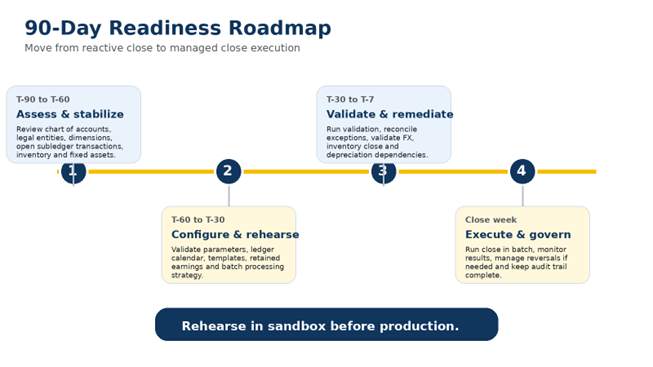
A 90-Day Readiness Roadmap for Finance Leaders
Year-end close excellence is built before the close window begins. Brightpoint recommends a structured readiness plan that starts at least 90 days before year end and includes process, data, configuration, performance and governance workstreams.
How Brightpoint Infotech Helps Organizations Improve Year-End Close
Brightpoint Infotech helps finance and IT teams strengthen their Dynamics 365 Finance close process across assessment, configuration, optimization and managed support.
Our consultants bring Microsoft Dynamics 365 expertise, finance process understanding and a practical focus on execution readiness.
Configuration review for GL parameters, ledger calendar, templates, retained earnings and dimension behavior.
Close checklist design and Financial period close workspace setup.
Validation, exception remediation and production close support.
Performance review and guidance for batch processing and Optimize Year-End Close enablement.
Post-close improvement roadmap, reporting support and managed services.
Frequently Asked Questions
Q1. What should be completed before running year-end close in Dynamics 365 Finance?
Ans. Organizations should review unposted journals, ledger settlements, subledger close activities, fixed asset depreciation, FX revaluation, inventory close activities, blocked periods, budget-controlled documents and year-end close validation output.
Q2. Why is the retained earnings account important?
Ans. The retained earnings account receives profit and loss balances during year-end close. Incorrect retained earnings setup can affect opening balances and financial reporting for the new fiscal year.
Q3. Should we use Close all or Close single for financial dimensions?
Ans. It depends on the reporting requirement and dimension volume. Close all preserves dimension detail but can create many retained earnings lines. Close single can consolidate a dimension when detailed carryforward is not required.
Q4. Can year-end close be reversed in Dynamics 365 Finance?
Ans. Yes, year-end close records can be reversed if needed. Reversals should be controlled, approved and documented because they affect opening and closing vouchers.
Q5. When should we consider the Optimize Year-End Close feature?
Ans. Consider it when the organization has large transaction volume, multiple legal entities or close runtime concerns. It requires the service add-in from Lifecycle Services and feature enablement in Dynamics 365 Finance.
Explore Brightpoint Infotech Solutions
Explore Our Recent Blogs & Resources Whether you are a start-up, an SMB, or an enterprise, the Brightpoint Infotech blog is the best place to get inspired and learn more about Microsoft Business Applications.