
|
Getting your Trinity Audio player ready...
|
Microsoft Copilot in 2026: How Businesses Can Plan, Implement & Scale AI
Microsoft Copilot has changed significantly from the early days of AI assistants. In 2026, businesses are looking beyond simple content generation and asking how Copilot can become part of everyday business operations, workflows, data, and decision-making.
For organizations using Microsoft 365, Dynamics 365, Power Platform, Azure, or other Microsoft technologies, Copilot can support employees across departments while also opening the door to customized AI agents and automated business processes.
But successful Copilot adoption involves more than purchasing licenses.
Businesses need to consider AI readiness, data, security, governance, use cases, employee adoption, training, and measurable business value before scaling Copilot across the organization.
That makes 2026 an important year for businesses to move from experimenting with AI to building a practical and sustainable AI strategy.
Why Microsoft Copilot Matters More in 2026
The biggest change is the shift from AI assistance to AI-enabled business processes.
Previously, an organization might have asked:
“Can Copilot help employees write emails faster?”
Now the conversation is becoming:
“Which business processes can AI improve, and how can we introduce it securely at scale?”
That change creates opportunities across departments.
Sales
Sales teams can use AI to summarize customer information, prepare communications, analyze opportunities, and reduce repetitive administrative work.
Finance
Finance teams can use AI to analyze information, summarize reports, support financial workflows, and accelerate routine knowledge work.
Customer Service
Customer service teams can use AI to summarize interactions, retrieve relevant information, prepare responses, and support service processes.
Marketing
Marketing teams can use Copilot to accelerate research, content development, campaign planning, and communication.
Human Resources
HR teams can use AI to support employee communications, documentation, information retrieval, and administrative activities.
Operations
Operations teams can explore AI-powered workflows that connect information, people, applications, and business processes.
The important point is that not every organization needs the same Copilot strategy.
The highest-value use cases depend on the company’s processes, data, users, Microsoft environment, and business objectives.
Microsoft Copilot Is Moving Toward AI Agents
One of the most important developments businesses should understand in 2026 is the growing role of AI agents.
A traditional AI assistant generally responds to a user’s request.
An agent can be designed around a particular business process or task.
For example, imagine a sales organization with an AI agent that helps employees review opportunities and identify accounts requiring follow-up.
Or an HR agent that helps employees find company policies and answers questions using approved organizational information.
Or a finance-focused agent that helps employees identify transactions requiring attention.
Microsoft’s current Dynamics 365 and Copilot direction increasingly incorporates agent-based capabilities into business workflows.
This creates a new opportunity for businesses:
Instead of simply asking AI questions, businesses can design AI around how work actually gets done.
The Biggest Mistake Businesses Make With Copilot
One of the easiest mistakes is to treat Copilot implementation as a licensing project.
The process becomes:
Purchase licenses → Give employees access → Expect adoption
But that doesn’t guarantee business value.
A better approach is:
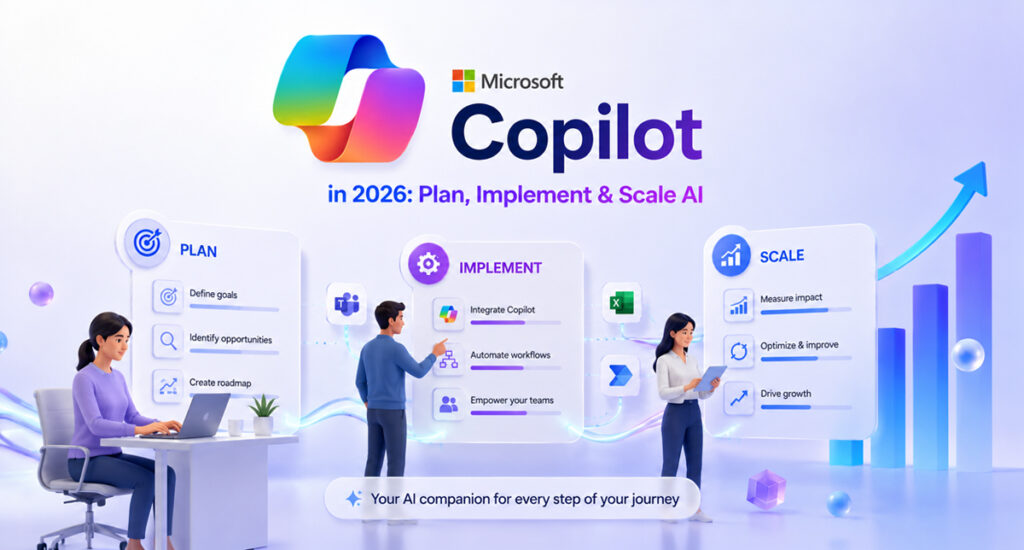
Assess → Identify use cases → Prepare data → Establish governance → Pilot → Train → Measure → Scale
Microsoft’s own rollout guidance recommends preparing the organization, assessing data and security considerations, beginning with a controlled rollout, training users, and measuring adoption before expanding.
This is why Copilot consulting and implementation can be valuable for organizations moving beyond experimentation.
Is Your Business Ready for Microsoft Copilot?
Before implementing Copilot across an organization, businesses should evaluate several areas.
- Business Readiness
Start by identifying the business problems you want AI to solve.
For example:
- Reduce repetitive administrative work
- Improve employee productivity
- Accelerate customer service
- Improve access to information
- Automate workflows
- Support sales teams
- Improve reporting
- Create AI-powered business processes
The technology should follow the business objective—not the other way around.
- Data Readiness
Copilot operates within an organization’s existing Microsoft environment and information access structure.
That makes data organization and permissions important.
Businesses should review:
- SharePoint information
- OneDrive content
- Teams data
- User permissions
- Sensitive information
- Data governance
- Existing security policies
Microsoft recommends organizations assess their environment and security controls as part of Copilot preparation.
- Security and Governance
AI adoption can increase the importance of existing data-access controls.
Before scaling Copilot, organizations should understand:
- Who can access business information?
- Which information is sensitive?
- How are permissions managed?
- What governance policies are in place?
- How should AI-generated content be reviewed?
- Which AI use cases require human oversight?
Microsoft’s Copilot Control System is designed to help organizations secure, manage, and measure Copilot and agent adoption across the enterprise.
A Practical Microsoft Copilot Implementation Roadmap
A structured implementation can help businesses reduce unnecessary risk and improve adoption.
Step 1: Assess Your Current Environment
Review your existing Microsoft ecosystem, users, data, applications, workflows, and security structure.
Step 2: Identify High-Value Use Cases
Don’t try to implement AI everywhere.
Prioritize use cases where Copilot can address a measurable business problem.
Step 3: Prepare Your Data
Review data organization, permissions, governance, and access before introducing AI at scale.
Step 4: Define Governance
Establish rules for responsible AI usage, security, human review, and information access.
Step 5: Start With a Pilot
Begin with a controlled group of users or departments.
A pilot allows the organization to understand adoption challenges and gather employee feedback before expanding.
Step 6: Train Employees
Employees should understand how to use Copilot effectively and how to review AI-generated results.
Training should cover both how to use Copilot and when human judgment is required.
Step 7: Measure Results
Track adoption and business impact rather than simply counting licenses.
Step 8: Scale
Once the organization has validated its use cases and adoption approach, expand Copilot and explore more advanced capabilities such as customized agents and automated workflows.
How Businesses Can Measure Copilot ROI
One of the biggest questions executives ask is:
“Is Microsoft Copilot actually delivering value?”
The answer shouldn’t be based only on the number of licenses purchased.
Businesses can evaluate:
Productivity
Are employees spending less time on repetitive work?
Adoption
Are employees actively using Copilot?
Time Savings
How much time is being saved on specific tasks?
Work Quality
Is AI assistance helping employees produce better or more consistent work?
Employee Experience
Are employees finding information and completing tasks more easily?
Business Outcomes
Are there measurable improvements in sales, customer service, finance, operations, or other departments?
Microsoft’s current Copilot management approach places greater emphasis on adoption and measuring business impact, rather than treating deployment as a one-time technology project.
Copilot Governance Should Be Part of the Strategy
As businesses move from individual AI experiments toward organization-wide adoption, governance becomes increasingly important.
A Copilot strategy should consider:
- Data access
- Security
- Privacy
- User permissions
- Responsible AI practices
- Human review
- Compliance requirements
- Agent management
- Monitoring
- Adoption measurement
This becomes even more important as organizations begin introducing customized AI agents into business processes.
The goal is not simply to make AI available.
The goal is to make AI useful, secure, controlled, and scalable.
When Should You Consider Microsoft Copilot Consulting?
Professional guidance can be particularly valuable if your organization:
- Is unsure where to begin with Copilot
- Wants to identify high-value AI use cases
- Has complex Microsoft 365 data and permissions
- Needs a Copilot readiness assessment
- Wants to develop a phased implementation strategy
- Needs employee adoption and training
- Wants to build customized AI agents
- Needs help connecting Copilot with existing Microsoft solutions
- Wants to measure Copilot ROI
- Needs support scaling AI across multiple departments
Instead of implementing Copilot simply because the technology is available, consulting can help connect the technology with specific business objectives.
Microsoft Copilot and the Next Stage of Business AI
The future of enterprise AI is unlikely to be based on one general-purpose chatbot.
Instead, businesses are moving toward a combination of:
Copilot + Business Data + Workflows + Agents + Automation + Governance
Microsoft’s 2026 Dynamics 365 direction reflects this broader movement toward AI-powered applications, agents, and connected business processes.
For businesses already invested in Microsoft’s ecosystem, this creates an opportunity to build AI into the systems employees already use rather than introducing completely separate AI platforms.
How Brightpoint Infotech Can Help With Microsoft Copilot
Implementing Microsoft Copilot successfully requires more than activating a license.
Brightpoint Infotech can help businesses evaluate their Microsoft environment, identify practical AI opportunities, plan Copilot adoption, and explore customized AI solutions.
Our approach can include:
- Copilot Readiness Assessment
- Microsoft Copilot Consulting
- Copilot Implementation
- AI Use-Case Identification
- Data & Security Readiness
- Copilot Adoption & Training
- Copilot Studio & Agent Development
- AI Workflow Automation
- Copilot Optimization & Support
If your organization is considering Microsoft Copilot but isn’t sure which use cases to prioritize, how to prepare your environment, or how to build a scalable AI roadmap, start with an assessment of your current needs.
Explore Microsoft Copilot Consulting & Implementation Services
Conclusion
Microsoft Copilot in 2026 is becoming much more than an AI assistant for everyday productivity.
Businesses are now exploring how Copilot, AI agents, automation, and connected business data can improve the way work gets done.
But successful adoption requires more than technology.
It requires:
Strategy + Data Readiness + Security + Governance + Implementation + Training + Adoption + Measurement
The organizations that get the most value from Copilot will not necessarily be the ones that deploy it to the largest number of employees first.
They will be the ones that identify the right business problems, prepare their environment, involve their people, measure results, and scale what works.
For businesses considering Microsoft Copilot in 2026, the better question isn’t simply:
“Should we implement Copilot?”
It is:
“Where can Copilot create measurable value for our business—and how can we implement it securely and at scale?”
That is where a well-planned Microsoft Copilot strategy can turn AI experimentation into meaningful business transformation.