
|
Getting your Trinity Audio player ready...
|
Dynamics 365 Business Central Pricing & Licensing Guide 2026: Costs, Plans, Storage, Implementation & TCO
Understand Business Central licensing, implementation costs, storage, environments and total cost of ownership before you build your ERP budget.
If your business is evaluating Microsoft Dynamics 365 Business Central, the license price is only the beginning of the budget.
The more important question is: What will Business Central actually cost your organization after licensing, implementation, migration, integrations, storage, training, apps, and ongoing support are included?
For businesses in the United States and Canada, Microsoft’s current U.S. list pricing is $80 per user/month for Business Central Essentials, $110 per user/month for Premium, and $8 per user/month for Team Members, with annual billing. Microsoft also offers a Device license for shared operational scenarios. Actual pricing can vary by country, currency, agreement, and partner.
This guide from Brightpoint Infotech explains how Business Central licensing works in 2026, what each license includes, how much implementation can cost, what storage and environments mean for your total cost of ownership, and where organizations commonly overpay.
Quick answer: For a typical North American SMB, the right Business Central budget should include four major components: software subscriptions + implementation + data/integration work + ongoing support and add-ons. A license-only calculation can significantly underestimate the first-year investment.
Business Central Pricing at a Glance
| Business Central option | Current U.S. list price* | Best suited for |
|---|---|---|
| Essentials | $80/user/month | Finance, sales, purchasing, inventory, projects, supply chain and core operations |
| Premium | $110/user/month | Organizations that also need manufacturing or service management |
| Team Members | $8/user/month | Users requiring limited read, update, approval and other permitted activities |
| Device | $45/device/month | Shared operational devices such as warehouse, shop-floor and similar scenarios |
| External Accountant | No additional license charge for up to 3 | Eligible third-party accountants |
*U.S. list pricing shown for reference and generally billed annually. Microsoft pricing and licensing terms can vary by market, currency, purchasing agreement and partner. Always confirm the applicable commercial terms before purchasing. Microsoft’s November 2025 price update moved Essentials from $70 to $80, Premium from $100 to $110, and Device from $40 to $45.
What Is Microsoft Dynamics 365 Business Central?
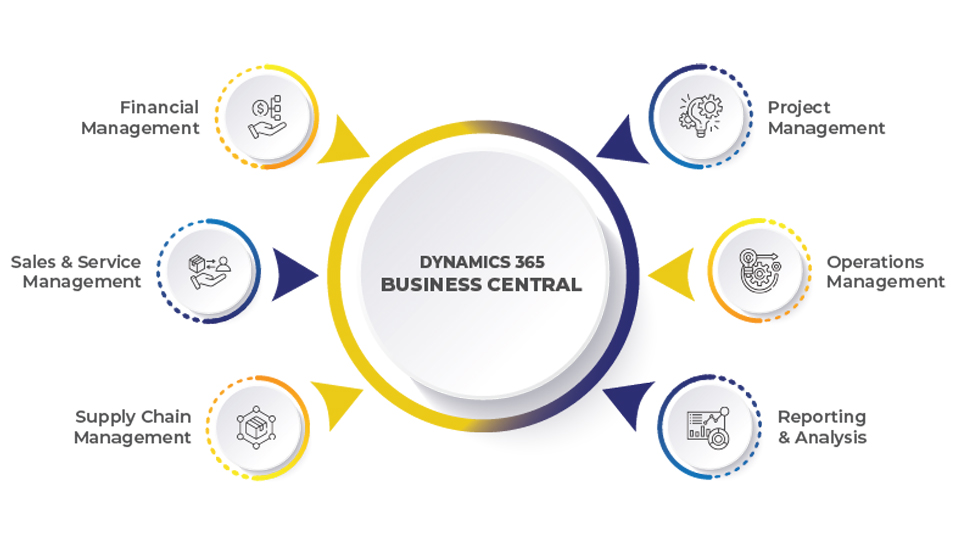
Microsoft Dynamics 365 Business Central is a cloud ERP platform designed to connect financial management, sales, purchasing, inventory, supply chain, projects and other business operations in one system.
For North American organizations, Business Central can be particularly relevant when a company has outgrown QuickBooks, Sage, spreadsheets or a legacy ERP such as Dynamics GP or NAV and needs a more connected cloud platform.
Business Central Essentials includes capabilities across financial management, CRM, project management, supply chain management, warehouse management and inventory. Premium adds Service Order Management and Manufacturing.
That distinction is important when estimating your license budget.
You should not choose Premium simply because it is the “higher” plan. The key question is whether your business actually requires the functionality covered by Premium.
How Much Does Dynamics 365 Business Central Cost in 2026?
For U.S. customers, Microsoft’s published list pricing is currently:
- Business Central Essentials: $80/user/month
- Business Central Premium: $110/user/month
- Business Central Team Members: $8/user/month
- Business Central Device: $45/device/month
Microsoft’s pricing change became effective November 1, 2025, and represented the first Business Central price increase in more than five years. The increase also changed the storage entitlement associated with the licenses.
Example: 10 full users
If all 10 users require Essentials:
10 × $80 × 12 = $9,600 per year
If all 10 require Premium:
10 × $110 × 12 = $13,200 per year
The difference is:
$3,600 per year
But licensing should be based on actual user roles rather than simply putting every employee on Premium.
For example, an organization might have:
- 8 Essentials users
- 2 Premium users
- 5 Team Members
However, organizations should carefully review Microsoft’s licensing rules before assuming that Essentials and Premium can be freely mixed within the same environment or tenant. Business Central’s company-level configuration determines whether users can access companies configured for Essentials or Premium functionality. Learn+1
This is one reason a Business Central licensing assessment is valuable before purchasing subscriptions.
Business Central Essentials vs. Premium
The most common licensing question is:
Do I need Business Central Essentials or Premium?
The answer depends primarily on your operational requirements.
Business Central Essentials
Essentials provides the core ERP capabilities most organizations need, including:
- Financial management
- General ledger
- Accounts receivable and accounts payable
- Bank reconciliation
- Fixed assets
- Cash flow forecasting
- Sales management
- Purchasing
- Inventory management
- Supply chain functionality
- Warehouse management
- Project management
- Basic CRM capabilities
- Multiple companies
- Microsoft Copilot capabilities included with the license
Microsoft’s March 2026 licensing guide lists financial management, CRM, project management, supply chain management, warehouse/inventory capabilities and other functionality under Essentials.
Who typically considers Essentials?
Essentials may fit organizations such as:
- Professional services companies
- Distributors
- Wholesalers
- Retail-related businesses
- Nonprofit organizations
- Growing service businesses
- Companies replacing QuickBooks or another entry-level accounting system
The actual fit depends on your processes and required functionality.
Business Central Premium
Premium includes everything in Essentials plus:
- Manufacturing
- Service Order Management
- Service Item Management
- Service Price Management
- Service Contract Management
- Production Orders
- Basic Capacity Planning
- Machine Centers
- Production Bill of Materials
- Manufacturing-related planning capabilities
Microsoft specifically defines Premium as Essentials plus Service Order Management and Manufacturing.
Who may need Premium?
Premium is generally relevant to organizations with requirements such as:
- Manufacturing operations
- Production orders
- Bills of materials
- Routings
- Capacity planning
- Machine centers
- Service contracts
- Service orders
- Field-oriented service processes
If manufacturing or service management is central to your ERP requirements, Premium should be evaluated during the solution-design stage.
What Is a Business Central Team Member License?
Team Members is a lower-cost license intended for users who do not need the full capabilities of Business Central.
Microsoft’s licensing guide gives Team Members specific permitted rights, including:
- Reading Business Central data
- Updating existing data and entries within permitted areas
- Approving or rejecting assigned workflow tasks
- Creating, editing and deleting sales or purchase quotes
- Managing personal information
- Editing job time sheets for approval
The license is for the named user’s own use and does not simply provide unrestricted Business Central access at a lower price.
Example
Consider a company with:
- 15 finance and operations users
- 10 managers who mainly review information and approve workflows
- 20 employees who occasionally need permitted Business Central activities
Instead of automatically licensing all 45 people with a full-user subscription, the organization can analyze each role against Microsoft’s licensing rights.
This can produce meaningful savings—but only when the user’s actual activities fit the license.
Important: Team Members is not “read-only Business Central”
This is a common misconception.
Team Members can have certain update and workflow rights. It is therefore better to think of Team Members as limited-use access, rather than simply a read-only license.
Business Central Device Licensing
Business Central also supports a Device license for specific shared-device scenarios.
A device license can be useful when multiple employees use the same operational workstation, such as:
- Warehouse terminals
- Production-floor devices
- Shared operational devices
- Certain point-of-sale scenarios
Microsoft describes Business Central Device users as concurrent users tied to licensed devices rather than named individual users. The number of users who can simultaneously use the devices depends on the number of device licenses purchased. Learn
The current U.S. list price is $45 per device/month, following Microsoft’s November 2025 pricing update.
When should you investigate a Device license?
A device model can be worth evaluating when:
- Multiple shifts share the same workstation
- Warehouse employees use common terminals
- A device is dedicated to a specific operational function
- Users do not require the full Business Central experience
But a Device license does not turn a shared terminal into a full Business Central user license. Its permitted functionality is limited. Learn+1
Are External Accountant Licenses Free?
For eligible Business Central customers, Microsoft allows up to three External Accountant licenses per customer tenant.
These licenses are intended for third-party accountants who need access to work with the customer’s financial data. Microsoft states that the licenses are available with Essentials and Premium and provide the appropriate Business Central rights while excluding user setup and administrative tasks.
This can be useful for:
- CPA firms
- External accountants
- Audit support
- Month-end close
- Financial review
However, an external accountant should not simply be treated as an ordinary internal employee. The correct licensing scenario matters.
Business Central Storage: The Cost Most Buyers Miss
The license price is not the only capacity consideration.
Business Central includes a tenant-level database storage allowance.
According to Microsoft’s current licensing documentation, the standard Business Central entitlement includes:
- 80 GB base database capacity
- 3 GB additional capacity per Essentials license
- 5 GB additional capacity per Premium license
- 1.5 GB per Device license
The capacity is shared across the tenant’s Business Central environments. Learn+1
For example, an organization with 20 Essentials users would have:
80 GB + (20 × 3 GB) = 140 GB
of Business Central database capacity under the standard entitlement calculation.
An organization with 20 Premium users would have:
80 GB + (20 × 5 GB) = 180 GB
before considering additional capacity purchases.
What consumes Business Central storage?
Storage can be affected by:
- Transaction history
- Attachments
- Images
- Documents stored in the database
- Media
- Extension data
- Historical records
- Multiple environments
Microsoft specifically notes that files and Blob data stored in the Business Central database count toward overall database capacity. Learn
How can you control storage costs?
A good Business Central data strategy can include:
- Moving suitable documents to SharePoint
- Establishing document-retention policies
- Archiving historical information where appropriate
- Reviewing extension data
- Monitoring storage by environment
- Avoiding unnecessary duplication of documents and media
Storage planning should be part of implementation—not an afterthought.
How Many Business Central Environments Are Included?
Essentials and Premium subscriptions include:
- 1 production environment
- 3 sandbox environments
at no additional charge. Learn+1
Organizations may need additional environments for:
- Development
- User acceptance testing
- Training
- Regional operations
- Integration testing
- Upgrade validation
- Performance testing
Microsoft offers additional environment capacity through the appropriate add-ons. Each additional production environment includes three additional sandbox environments and 4 GB of tenant-wide database capacity. Learn
This is an important budgeting consideration for organizations with mature development and release-management processes.
Business Central Implementation Cost in 2026
Here is where many ERP budgets become unrealistic.
The monthly subscription is relatively easy to calculate.
The implementation is not.
There is no universal Microsoft-set Business Central implementation fee because implementation depends on the scope of the project.
Current 2026 market sources show indicative implementation ranges such as:
| Organization profile | Indicative implementation range |
|---|---|
| Small / straightforward deployment | ~$25,000–$45,000 |
| Growing SMB / moderate complexity | ~$45,000–$90,000 |
| Mid-market / complex implementation | ~$90,000–$150,000+ |
| Highly customized, multi-entity or multi-country programs | Can exceed these ranges significantly |
These figures are market estimates, not Microsoft-published prices, and should be used for initial planning rather than as a quotation.
A North American implementation can also vary significantly based on whether delivery is primarily onshore, offshore or blended.
What Determines Business Central Implementation Cost?
Instead of asking only:
“How much does Business Central implementation cost?”
ask:
“What is included in the implementation scope?”
The answer can change your budget substantially.
1. Business Process Complexity
A company with standard finance and distribution processes may require considerably less configuration than a manufacturer with:
- Production planning
- BOMs
- Routings
- Capacity planning
- Warehouse processes
- Quality processes
- Complex costing
2. Number of Legal Entities
A single company is usually simpler than a group operating:
- Multiple legal entities
- Multiple currencies
- Multiple countries
- Intercompany transactions
- Consolidated reporting
3. Data Migration
Migration requirements can include:
- Customers
- Vendors
- Items
- Chart of accounts
- Opening balances
- Historical transactions
- Fixed assets
- Inventory
- Dimensions
- Open receivables
- Open payables
The more history you migrate, the more effort is generally required for extraction, cleansing, transformation, validation and reconciliation.
4. Integrations
Common integrations may include:
- Shopify
- WooCommerce
- Salesforce
- E-commerce platforms
- Banking systems
- Payroll
- Tax applications
- Shipping platforms
- Warehouse management systems
- EDI
- Power BI
- Microsoft 365
- Third-party ISV applications
Each integration introduces additional design, development, testing and support requirements.
5. Customization
Business Central supports extensive configuration and extensibility.
But every custom requirement should be evaluated against the standard functionality first.
A useful implementation principle is:
Configure first. Extend when necessary. Customize only when there is a clear business case.
This can reduce implementation complexity and future upgrade costs.
Business Central Implementation Cost Checklist
Before comparing implementation proposals, ask whether the following are included:
- Business process discovery
- Solution architecture
- Chart of accounts configuration
- Financial dimensions
- User and security setup
- Master data migration
- Historical data migration
- Opening balances
- Inventory migration
- Bank integration
- Tax configuration
- E-commerce integration
- CRM integration
- EDI
- Power BI reporting
- ISV applications
- Custom extensions
- Testing
- User acceptance testing
- Training
- Go-live support
- Post-go-live support
- Documentation
A low implementation quote may simply mean that some of these costs are outside the stated scope.
What Is the Total Cost of Ownership of Business Central?
A realistic Business Central budget should look beyond the subscription.
A useful five-part model is:
1. Software Licensing
Your recurring Microsoft subscription.
2. Implementation
Configuration, project management, consulting, development and deployment.
3. Migration
Data extraction, cleansing, transformation, validation and reconciliation.
4. Integrations and Apps
Third-party applications, connectors, EDI, e-commerce, payroll, tax and other integrations.
5. Ongoing Support
Post-go-live support, enhancements, optimization, reporting, upgrades and user assistance.
You may also need to consider:
- Additional database capacity
- Additional environments
- Power Platform consumption
- Copilot-related consumption for certain advanced AI scenarios
- ISV subscriptions
- Training
- Reporting tools
- Managed services
The result is a much more useful calculation:
Business Central TCO = Licensing + Implementation + Migration + Integrations/Apps + Training + Support + Additional Capacity
Is Microsoft Copilot Included in Business Central?
Yes, Microsoft includes Copilot capabilities with Business Central Essentials and Premium licenses.
Microsoft’s March 2026 licensing guide also documents Business Central Agents, including capabilities such as the Sales Order Agent and Payables Agent. However, organizations should distinguish between Copilot capabilities included with the Business Central subscription and AI scenarios that may consume additional Copilot Credits or other services.
This distinction matters because “AI included” does not necessarily mean every possible AI workload is unlimited at no additional cost.
When planning an AI-enabled Business Central implementation, ask:
- Which Copilot capabilities are included?
- Which agents will we use?
- Will additional Copilot Credits be required?
- What data will AI access?
- What governance and security controls are required?
- What business processes should actually be automated?
Business Central and Microsoft 365: Another Licensing Opportunity
Organizations already using Microsoft 365 should also understand Microsoft’s Business Central access options.
Microsoft documents scenarios in which eligible Microsoft 365 users can access shared Business Central information through Microsoft Teams without purchasing a separate Business Central license for that read-only scenario. This does not provide full Business Central access through the browser and is not a substitute for a Business Central user license when users need broader functionality. Learn+1
This can be useful for employees who only need occasional visibility into:
This can be useful for employees who only need occasional visibility into:
- Customers
- Sales information
- Business records
- Shared operational information
The exact Microsoft 365 plan and configuration requirements should be verified before relying on this model.
Can You Mix Essentials and Premium Licenses?
This question deserves more nuance than a simple “yes” or “no.”
Business Central functionality is controlled at the company level through the User Experience setting. Microsoft documents that a tenant can contain multiple environments and that users with different license types can sign into the same environment, while access to individual companies depends on how those companies are configured.
An Essentials user cannot open a company configured for Premium functionality. A Premium user can access a company configured for Essentials, although Premium-only functionality is not available in that Essentials-configured company. Learn
Because licensing configurations can become complex in multi-company environments, businesses should map users, companies and required functionality before purchasing licenses.
Is There a Minimum Number of Business Central Users?
Do not rely on the common claim that Business Central requires a specific minimum number of users.
Microsoft’s current licensing documentation states that minimum license purchase requirements can apply to some Dynamics 365 products and directs customers to the Product Terms for the applicable requirements.
For a specific Business Central subscription, your Microsoft partner or CSP should confirm the commercial requirements that apply to your market and agreement.
More importantly, implementation economics are different from licensing minimums.
A company may technically license a small number of users but still need to determine whether an ERP implementation makes financial and operational sense.
What Happens If You Stop Paying for Business Central?
Subscription cancellation and data retention are areas where businesses should avoid relying on generic ERP assumptions.
Business Central is a cloud subscription service, and organizations should establish a formal data-retention and exit plan before cancelling.
That plan should address:
- Data export
- Financial records
- Documents and attachments
- Reporting history
- Audit requirements
- Integrations
- Custom extensions
- Business continuity
- Access to historical information
The precise data-retention behavior applicable to a subscription can depend on Microsoft’s current service terms and should be confirmed with Microsoft or your CSP before cancellation.
How Can You Reduce Business Central Licensing Costs?
The objective should not be to buy the cheapest license.
The objective should be to buy the right license for each user’s actual work.
Here are several areas to review.
1. Perform a User-Role Analysis
Create a spreadsheet with:
| User/Role | Daily Activities | Required Functionality | Recommended License |
|---|---|---|---|
| CFO | Financial management, reporting | Full finance | Essentials/Premium |
| AP Clerk | Vendor invoices, payments | Finance | Essentials/Premium |
| Warehouse Clerk | Permitted warehouse activities | Limited operational access | Review Team Member/Device scenario |
| Department Manager | Approvals and review | Limited access | Team Member may fit |
| Production Manager | Manufacturing | Manufacturing | Premium |
| External CPA | Accounting review | External accountant | External Accountant |
The final license decision should be validated against Microsoft’s current use rights.
2. Review Shared Devices
If multiple employees use the same operational terminal, investigate whether a Device license is appropriate.
3. Avoid Unnecessary Premium Licensing
If your business does not require manufacturing or service management functionality, evaluate whether Essentials is sufficient.
4. Control Database Growth
Move appropriate documents and files out of the Business Central database where your architecture allows it.
5. Review Your Users Regularly
Employee turnover and organizational changes can leave businesses paying for licenses that are no longer required.
6. Review ISV Applications
Third-party apps can introduce additional recurring costs. Evaluate whether every installed application is still necessary.
7. Use Standard Business Central Functionality Where Practical
Excessive customization can increase implementation, maintenance and upgrade costs.
Business Central Pricing for U.S. and Canadian Businesses
For North American buyers, pricing should be considered in the context of the market where the subscription will actually be purchased.
Microsoft publishes U.S. pricing in USD, while other markets may have local-currency pricing and different commercial terms.
Brightpoint Infotech supports organizations across the United States and Canada and has offices/contact presence in Coral Springs, Florida and Toronto, Ontario. Brightpoint Infotech
For Canadian organizations, ask your partner to provide the quote in CAD and confirm:
- Local Microsoft list pricing
- Taxes
- Billing terms
- Currency
- Partner discounts, if applicable
- Contract duration
- Add-on costs
- Implementation fees
- Support fees
Do not convert U.S. list pricing into Canadian dollars and assume the result is your final Canadian subscription price.
Business Central Pricing Example: A Growing North American Company
Consider a hypothetical distributor with:
Business Central Pricing Example: A Growing North American Company
- 15 full users
- 5 limited users
- 1 production environment
- 2 sandboxes
- Shopify integration
- Power BI reporting
- 5 years of historical data
- Basic warehouse management
A license-only budget might start with:
15 Essentials users × $80 × 12 = $14,400/year
5 Team Members × $8 × 12 = $480/year
Estimated base subscription = $14,880/year
But that is not the total project cost.
The organization may also need:
- Implementation consulting
- Data migration
- Shopify integration
- Power BI work
- User training
- Testing
- Support
- ISV applications
- Additional storage in the future
This is why an ERP business case should compare total cost of ownership, rather than simply comparing subscription prices.
Business Central Migration: GP, NAV, QuickBooks and Other ERP Systems
Pricing becomes particularly important when Business Central is replacing another ERP.
Brightpoint Infotech supports Microsoft ERP modernization and migration scenarios, including transitions from legacy Microsoft ERP platforms. The company specifically provides Business Central migration and upgrade services for organizations moving from Dynamics GP and other Microsoft ERP environments.
A migration budget should consider:
Legacy system assessment
Understand what the existing system actually does before attempting to reproduce it.
Data quality
Poor master data can become one of the biggest migration risks.
Historical data
Decide whether historical transactions need to be migrated into Business Central or retained in an accessible legacy archive.
Customizations
Review existing customizations and determine which should be:
- Replaced with standard Business Central functionality
- Rebuilt as extensions
- Replaced by AppSource solutions
- Retired
Integrations
Inventory every integration before project kickoff.
User adoption
A technically successful migration can still fail to deliver value if employees do not understand the new processes.
Business Central Pricing FAQ
How much does Microsoft Dynamics 365 Business Central cost?
Current U.S. list pricing is $80/user/month for Essentials, $110/user/month for Premium and $8/user/month for Team Members, generally billed annually. Microsoft also offers a Device license for qualifying shared-device scenarios.
Is Business Central Essentials or Premium better for my company?
Neither license is universally appropriate. Essentials covers core ERP functionality, while Premium adds manufacturing and service management. Your required business processes should determine the license.
What is the difference between Essentials and Premium?
Premium includes everything in Essentials plus Business Central’s manufacturing and service management capabilities.
How much is a Business Central Team Member license?
The U.S. list price is currently $8 per user/month, billed annually. Team Members provides limited access rather than full Business Central functionality.
Does Business Central have a Device license?
Yes. Microsoft provides a Business Central Device license for qualifying shared-device scenarios. The current U.S. list price is $45 per device/month.
How much storage does Business Central include?
Business Central includes 80 GB of base database capacity. Essentials licenses accrue 3 GB each and Premium licenses accrue 5 GB each under Microsoft’s current licensing model. Learn+1
How many sandbox environments are included?
Essentials and Premium subscriptions include one production environment and three sandbox environments at no additional charge. Learn
Are External Accountant licenses free?
Eligible Business Central customers can procure up to three External Accountant licenses per tenant without an additional license charge. Learn+1
Does Microsoft 365 provide free Business Central access?
Eligible Microsoft 365 users can access certain Business Central data shared through Microsoft Teams in supported scenarios. This is read-only access and does not replace a full Business Central license. Learn
How much does a Business Central implementation cost?
There is no single Microsoft-set implementation price. Current 2026 market estimates commonly range from tens of thousands of dollars for straightforward deployments to $100,000+ for complex implementations. Scope, users, entities, integrations, migration, customization and industry requirements can move the number substantially.
Does Business Central pricing include implementation?
No. The Microsoft subscription and implementation services are separate budget items. Implementation typically involves configuration, migration, testing, training, integrations and deployment.
Can Business Central replace QuickBooks?
Business Central can provide significantly broader ERP functionality than entry-level accounting software, including inventory, purchasing, supply chain, projects and other operational capabilities. Whether migration makes financial sense depends on your organization’s size, processes and growth requirements.
Can Business Central replace Dynamics GP?
Business Central is a modern Microsoft cloud ERP option for organizations evaluating a move from Dynamics GP. The appropriate migration approach depends on your GP version, customizations, integrations, data and business processes.
Does Business Central support manufacturing?
Yes. Manufacturing functionality is included with the Premium license.
Does Business Central support service management?
Yes. Service management capabilities are included with Premium.
Business Central Pricing Checklist for CFOs and IT Leaders
Before signing a Business Central subscription or implementation agreement, make sure you can answer these questions:
Licensing
Pricing becomes particularly important when Business Central is replacing another ERP.
A migration budget should consider:
- Replaced with standard Business Central functionality
- Rebuilt as extensions
- Replaced by AppSource solutions
- Retired
Integrations
User adoption
Why Business Central Pricing Should Be Part of Your ERP Strategy
Business Central pricing is easy to reduce to a single number.
That is the wrong way to evaluate an ERP.
A $80 user license does not tell you whether your implementation will cost $30,000 or $150,000.
Likewise, choosing the $110 Premium license does not automatically make sense simply because it includes more functionality.
The better approach is to connect user roles, business processes, implementation scope and long-term operating requirements.
For North American organizations, that means building a Business Central business case around:
Licensing + Implementation + Data + Integrations + Training + Support + Capacity
That gives your CFO, IT team and operational leaders a much more realistic picture of the investment.
How Brightpoint Infotech Supports Your Business Central Journey
Choosing an ERP is only one part of the transformation. The implementation approach, migration plan, integrations, user roles and ongoing support all influence the real cost and value of Business Central.
Brightpoint Infotech provides Microsoft Dynamics 365 Business Central services covering implementation, migration, integration, reporting, customization, upgrades and ongoing support.
Start Your Business Central Journey With a Fixed-Scope ERP Package
Microsoft Dynamics 365 Business Central — Get ERP consulting, implementation, migration, integration and support. Starter package from $5,000.
More Business Central Resources
Business Central Services From Brightpoint Infotech
Brightpoint Infotech can help organizations with:
- Business Central implementation
- Dynamics GP to Business Central migration
- Dynamics NAV to Business Central modernization
- Business Central upgrades
- Data migration
- Business Central integrations
- Power BI reporting
- Business Central customization
- Manufacturing ERP
- Distribution ERP
- Business Central support and managed services
- Licensing and solution assessment
The objective should be more than deploying ERP software. It should be to create a Business Central environment that fits your organization’s processes, users, data and growth plans.
Get a Business Central Pricing & Licensing Assessment
If you are planning a Business Central implementation, migration or license renewal, Brightpoint Infotech can help you build a more complete cost model.
Instead of starting with “How many licenses should we buy?”, start with:
“What does each person actually need to do in Business Central?”
That role-based approach can help identify the appropriate licensing model, implementation scope and long-term ERP investment.
Talk to Brightpoint Infotech about your Business Central requirements and request a Business Central assessment.
Get a Business Central Pricing & Licensing Assessment
Planning a Business Central implementation, migration or license renewal? Build your budget around licensing, implementation, migration, integrations, training, support and capacity.
Book Your Free Microsoft Dynamics 365 Consultation →