From SAP BusinessObjects to Power BI: Why Modern Analytics Demands a Strategic Migration
Introduction
Executive Summary
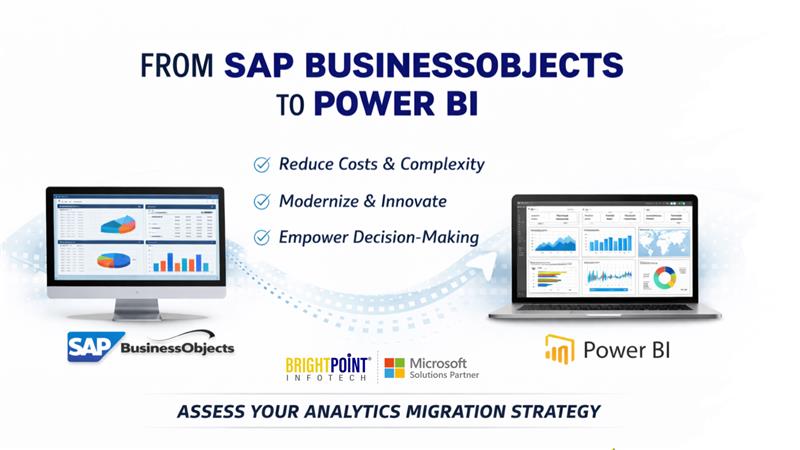
Across industries, enterprises are reassessing long-standing business intelligence platforms that were designed for a different era. SAP BusinessObjects (BO), once the backbone of enterprise reporting, is increasingly viewed as operationally expensive, rigid, and misaligned with modern analytics expectations.
In contrast, Power BI represents a shift toward cloud-first, self-service, and AI-augmented decision intelligence. However, successful migration is not a technical conversion exercise—it is a strategic analytics modernization initiative.
Market Context: The Shift from Legacy BI to Decision Intelligence
Analyst consensus is clear: organizations are moving away from static, report-centric BI toward dynamic, insight-driven platforms that support faster decisions, broader adoption, and lower total cost of ownership (TCO).
Legacy BI platforms like BO were designed for:
Centralized IT ownership
Heavily modeled semantic layers
Pixel-perfect, static reporting
Modern analytics platforms like Power BI are built for:
Business-led self-service
Cloud scalability
Embedded AI and automation
Continuous insight delivery
This structural mismatch is driving enterprises to rethink—not just replace—their analytics stack.
Why SAP BusinessObjects Is Reaching Its Strategic Limits
Rising Cost with Diminishing Returns
BO environments typically require:
Dedicated servers and infrastructure
Specialized skills to maintain Universes and WebI reports
Ongoing licensing and upgrade costs
As usage declines and alternatives proliferate, cost per insight continues to rise.
Limited Agility in a Real-Time World
Business users increasingly expect:
Interactive exploration
Real-time or near-real-time data
Mobile-first analytics
BO’s report-centric architecture makes it difficult to meet these expectations without extensive customization.
Semantic Layer Complexity Becomes a Bottleneck
While BO Universes were once a strength, they now represent:
Tight coupling between data and reports
High dependency on IT for changes
Limited reuse across analytics use cases
Modern BI favors lightweight, reusable semantic models closer to the data.
Power BI: A Platform Built for Modern Analytics
Power BI aligns with today’s enterprise analytics priorities:
Key differentiators
Cloud-native and hybrid deployment options
Rich interactive visualizations
Native integration with Excel, Teams, Azure, and enterprise data platforms
Built-in AI, Copilot, and natural language queries
Lower entry cost and faster deployment cycles
But the real value emerges when Power BI is implemented as a strategic analytics layer, not just a reporting tool.
The Critical Insight: BO to Power BI Is NOT a 1:1 Migration
Organizations that attempt a direct “report-for-report” conversion often fail to realize the benefits of Power BI.
Leading organizations take a different approach:
Reassess which reports still deliver business value
Redesign KPIs and dashboards for decision-making, not replication
Rebuild semantic logic in data warehouses, SQL views, or Power BI datasets
Reduce report sprawl and focus on insight-driven experiences
This is where many migrations either succeed—or stall.
A Strategic Migration Framework
Phase 1: Assessment & Rationalization
Inventory BO reports, Universes, and users
Identify Migrate / Modernize / Retire candidates
Quantify business value and usage
Phase 2: Data & Semantic Redesign
Decouple logic from Universes
Establish governed, reusable Power BI datasets
Align data models to business domains
Phase 3: Experience Modernization
Replace static reports with interactive dashboards
Apply row-level security and role-based access
Enable self-service with guardrails
Phase 4: Adoption & Decommissioning
Parallel run for critical reports
User enablement and governance
Retire BO infrastructure and licenses
Business Outcomes Organizations Achieve
Enterprises that execute this transition strategically report:
30–50% reduction in BI operating costs
Faster insight delivery (weeks → days)
Higher business user adoption
Reduced dependency on specialized BI developers
A future-ready analytics foundation aligned with AI initiatives
Final Thought: Modernization Is a Business Decision, Not an IT Project
Migrating from SAP BusinessObjects to Power BI is less about tools and more about redefining how decisions are made across the organization.
Organizations that treat this as a structured analytics transformation—rather than a technical migration—are the ones that unlock lasting value.
Start with an Analytics Assessment
Before migrating a single report, clarity is critical.
Our BO to Power BI Assessment helps you:
Identify high-value vs low-value reports
Define a realistic migration roadmap
Estimate effort, timelines, and cost savings
Avoid common migration pitfalls
Build a business case for modernization
Book your BusinessObjects to Power BI Assessment today Let’s help you move from legacy reporting to insight-driven decision intelligence—with confidence.
Explore Brightpoint Infotech Solutions
Explore Our Recent Blogs & Resources Whether you are a start-up, an SMB, or an enterprise, the Brightpoint Infotech blog is the best place to get inspired and learn more about Microsoft Business Applications.