
|
Getting your Trinity Audio player ready...
|
Payables Agent in Business Central: What’s New and How It Transforms AP
Introduction
For many organizations, accounts payable (AP) is a crucial but challenging function. Finance teams often face the tedious task of manually entering vendor invoice data, matching invoices to vendors, and ensuring accuracy before posting. These repetitive tasks consume significant time and resources, increasing the risk of human error and slowing down the entire finance operation.
With increasing invoice volumes and growing expectations for faster financial processing, traditional manual AP workflows are no longer sufficient. Recognizing this challenge, Microsoft has introduced an innovative solution in Dynamics 365 Business Central — the Payables Agent. This AI-powered assistant is designed to revolutionize how invoices are handled by automating critical parts of the invoice processing workflow, while maintaining necessary human oversight.
In this blog, we provide a comprehensive look at the Payables Agent — exploring what it is, how it works, its benefits, limitations, and how your business can start leveraging it today.
What Is the Payables Agent?
The Payables Agent is essentially a digital teammate embedded within Business Central. Unlike rigid automation tools that require complex setups, this agent uses artificial intelligence to seamlessly integrate with your existing AP process.
At its core, the Payables Agent monitors a dedicated Microsoft 365 mailbox where vendor invoices are sent. Instead of requiring manual uploads or imports, it automatically fetches invoices received via email, extracting key details like vendor information, invoice numbers, dates, and line items. Using advanced AI technologies such as Azure Document Intelligence, it interprets invoice content with high accuracy.
Once the data is extracted, the agent intelligently matches invoices to existing vendors or suggests creating new vendor entries if no match is found. It then drafts purchase invoices in Business Central, pre-filling accounting details based on historical data and organizational policies. However, the agent does not post invoices on its own; a finance team member reviews, adjusts if necessary, and approves these drafts before final posting.
This human-in-the-loop approach ensures control, compliance, and auditability while freeing up finance professionals from repetitive data entry and validation tasks.
Why Automate Accounts Payable?
Traditional accounts payable processing involves several manual steps that introduce inefficiencies and risks. Vendors often send invoices in diverse formats — paper, email PDFs, or scanned documents — making it difficult to standardize processing. Finance teams must manually open emails, download attachments, enter data into ERP systems, and cross-check vendor records, all of which is time-consuming and error-prone.
Additionally, matching invoices to vendors or purchase orders can become complex, especially for organizations managing a large supplier base. Manual processes also increase the likelihood of missed or delayed payments, which can hurt vendor relationships or lead to penalties.
By automating these tasks, the Payables Agent helps organizations reduce invoice processing time dramatically, improve data accuracy, and scale operations without increasing headcount. This automation also enables AP teams to focus more on exceptions, strategic vendor management, and financial analysis, thus increasing overall finance function value.
How Does the Payables Agent Work?
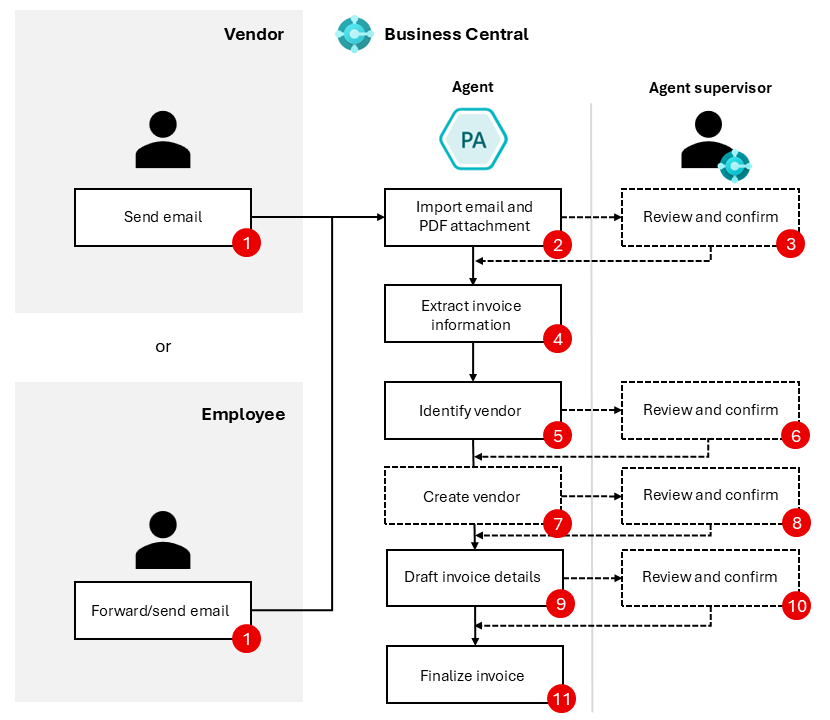
Understanding the Payables Agent’s workflow is essential to appreciating its impact. Below is an end-to-end description of how invoices move from email receipt to draft invoice creation in Business Central:
Monitoring Email for Incoming Invoices
The Payables Agent is configured to monitor a dedicated shared mailbox in Microsoft 365 where vendors send invoices. This mailbox serves as the single source of truth for all incoming invoice emails, minimizing the risk of lost or overlooked documents.
Once an invoice email arrives, the agent detects it automatically, identifying unread emails and retrieving any attached PDF invoices. This eliminates the need for AP staff to manually open emails or download attachments, saving valuable time and effort.
Using an internal-only mailbox for invoices is recommended to reduce noise from unrelated emails, ensuring that only legitimate vendor invoices enter the system.
Importing Invoices into Business Central
Each invoice PDF attachment is imported directly into Business Central’s Inbound E-Documents queue. If an email contains multiple PDF attachments, the agent processes each PDF separately, creating an electronic document record for every invoice.
This electronic document becomes the container that holds all extracted data, and serves as the starting point for further processing.
AI-Powered Data Extraction and OCR
After import, the Payables Agent leverages Azure Document Intelligence, a sophisticated Optical Character Recognition (OCR) and machine learning service, to analyze each invoice. It extracts key fields such as vendor name and address, invoice number, invoice and due dates, line items with quantities and prices, tax amounts, and totals.
Business Central provides tools that allow AP supervisors to validate and review this extracted data easily. For example, an enhanced attachment viewer lets users view the original invoice PDF side-by-side with extracted fields, helping verify accuracy and make corrections if necessary.
The AI engine is even smart enough to flag documents that might not be invoices (like credit notes or purchase orders) so they can be routed appropriately.
Matching or Creating Vendors
Once data extraction is complete, the Payables Agent attempts to match the invoice vendor with existing vendor records in Business Central. If a confident match is found, the invoice is linked accordingly.
When no match exists or the confidence level is low, the agent suggests creating a new vendor record based on extracted details. Importantly, these new vendor records are created in a blocked state, requiring manual review and approval by finance staff before they can be used in transactions — ensuring proper governance and audit controls.
Draft Invoice Creation
With vendor data confirmed, the agent proceeds to draft the purchase invoice. Using historical purchase patterns, account coding, and dimension defaults, it intelligently pre-populates the draft invoice with suggested general ledger accounts, cost centers, and line items.
The draft acts as a preliminary invoice that awaits human review. Finance teams can edit, add, or remove lines, adjust amounts, and update accounting details as necessary.
Review and Approval
Human oversight is a cornerstone of the Payables Agent’s design. Draft invoices generated by the agent are never posted automatically. Instead, designated AP users review the drafts, confirm accuracy, and post invoices into the system.
This ensures the final invoice posting reflects the correct business context, complies with policies, and prevents errors or fraud.
Key Features in Depth
The Payables Agent delivers a range of intelligent capabilities that together create a seamless and automated AP workflow:
Automated Invoice Capture from Email
By continuously monitoring a designated Microsoft 365 inbox, the agent captures incoming invoices in real-time. This eliminates manual intervention, ensuring no invoice slips through unnoticed.
Advanced AI-Powered OCR and Data Extraction
Utilizing Azure Document Intelligence, the agent accurately extracts all relevant invoice information, even from complex or non-standard formats. This precision minimizes the need for manual corrections.
Vendor Matching and New Vendor Creation
Smart matching algorithms reduce errors and streamline vendor management. When new vendors are detected, the system suggests blocked vendor records pending approval, maintaining data integrity.
Draft Purchase Invoice Generation
The agent drafts purchase invoices with suggested account codes and dimensions based on company purchase history, speeding up the preparation process.
Human-in-the-Loop Control
No automation replaces human judgment. Finance teams review and adjust draft invoices to maintain control, compliance, and accuracy.
Business Benefits
Implementing the Payables Agent yields significant benefits:
-
Improved Efficiency: By automating repetitive invoice processing tasks, finance teams reduce turnaround times and free up resources for higher-value activities.
-
Reduced Errors: Automated extraction and vendor matching significantly lower manual entry errors, reducing costly mistakes and rework.
-
Scalability: The system scales effortlessly to handle increasing invoice volumes without adding headcount, supporting business growth.
-
Greater Compliance and Control: Human review and approval ensure audit readiness and prevent unauthorized transactions.
-
Enhanced Staff Satisfaction: Finance professionals can focus on strategic tasks rather than tedious data entry, improving job satisfaction.
Current Limitations
As an evolving preview feature, the Payables Agent has certain limitations to be aware of:
-
It currently supports only PDF invoice formats. Other formats such as scanned images or paper invoices require manual entry.
-
Maximum invoice size is limited to 5 MB and up to 10 pages per invoice.
-
Processing capacity is limited to approximately 100 emails and 500 invoices daily to ensure system stability.
-
The feature does not yet support purchase order matching, approval workflows, or anomaly detection, though these are planned for future updates.
-
Currently, it supports only the English language.
Despite these constraints, the Payables Agent offers meaningful automation for many common AP scenarios, particularly non-PO invoices like utilities, rent, and subscriptions.
How to Get Started
Getting started with the Payables Agent is straightforward. Begin by enabling the feature within Business Central’s settings under Copilot & agent capabilities. Next, configure a shared Microsoft 365 mailbox to serve as the invoice intake inbox.
Assign roles and permissions so your AP supervisors can review and approve draft invoices. Then, as invoices arrive via email, the agent will start processing them automatically, generating draft purchase invoices ready for your review.
Microsoft’s official setup documentation provides detailed step-by-step guidance to ensure a smooth implementation.
Frequently Asked Questions (FAQ)
Q1: Will the Payables Agent post invoices automatically?
No. The agent creates draft invoices that must be reviewed and approved by finance staff before posting, maintaining control and compliance.
Q2: What invoice formats are supported?
Currently, only PDF invoices are supported. Support for other formats may be introduced in future releases.
Q3: Can the agent match invoices to purchase orders?
This functionality is not yet available but is planned for future updates.
Q4: How does the AI extraction work?
The agent uses Azure Document Intelligence to analyze invoice PDFs and extract key data fields automatically with high accuracy.
Q5: Can the agent create new vendor records?
Yes. It suggests new vendor records based on invoice data, but these remain blocked until manually reviewed and approved.
Q6: Is this feature available in multiple languages?
Currently, the Payables Agent supports only English.
Conclusion
The Payables Agent in Dynamics 365 Business Central represents a powerful advancement in accounts payable automation. It blends artificial intelligence with human oversight to accelerate invoice processing, reduce errors, and free up finance teams to focus on more strategic initiatives.
At Brightpoint Infotech, we are excited to help organizations implement and optimize the Payables Agent to unlock its full potential, driving efficiency, accuracy, and business value in your finance operations.
Including the official Microsoft video alongside your blog post will further enhance reader understanding by providing a clear, visual demonstration of how the Payables Agent transforms accounts payable.
Explore Brightpoint Infotech Solutions
Explore Our Recent Blogs & Resources
Whether you are a start-up, an SMB, or an enterprise, the Brightpoint Infotech blog is the best place to get inspired and learn more about Microsoft Business Applications.