

|
Getting your Trinity Audio player ready...
|
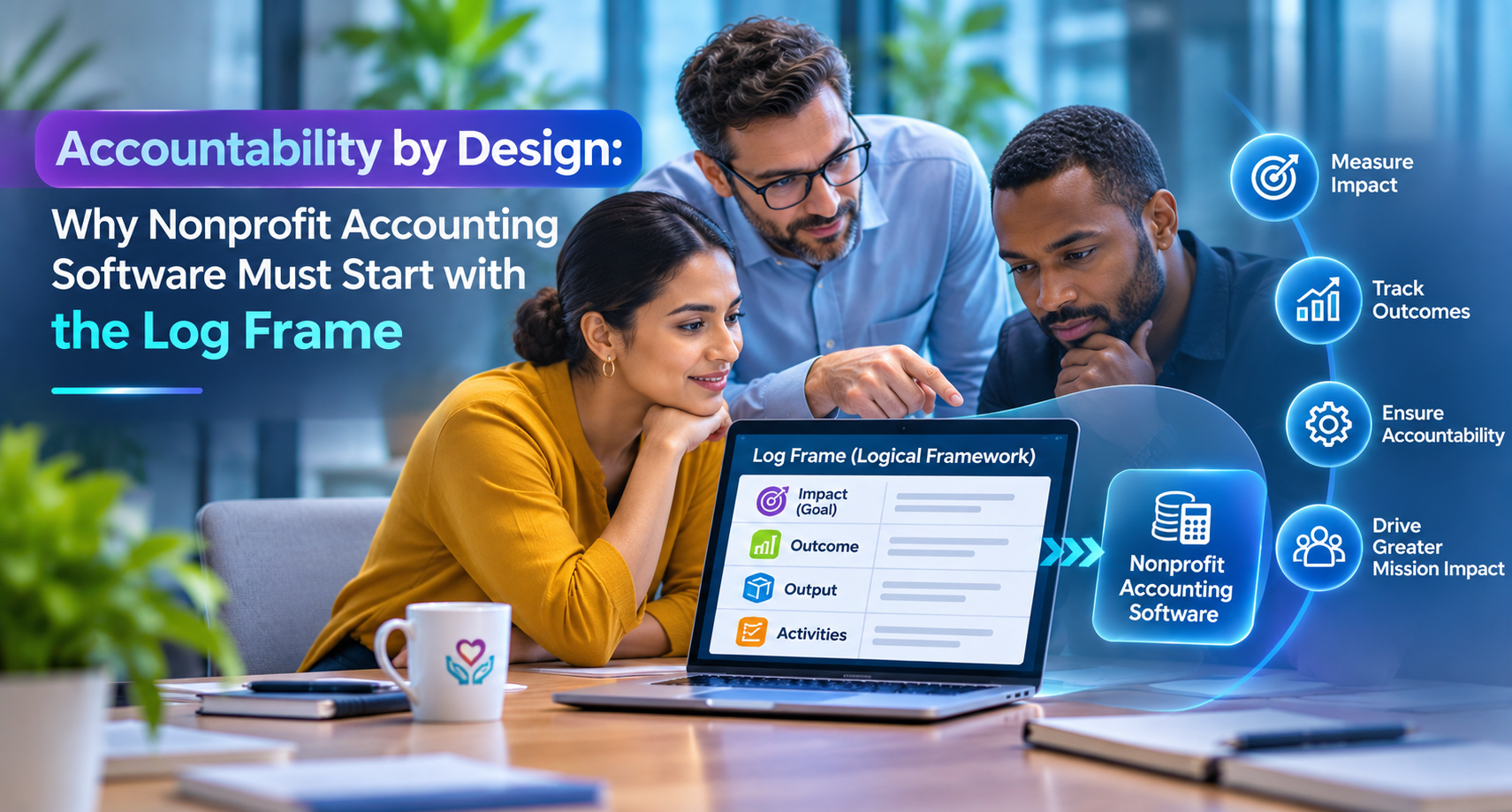
Accountability by Design: Why Nonprofit Accounting Software Must Start With the Log Frame
Nonprofit accounting software should prove accountability as money moves. See a Business Central architecture for log-frame budgets and budget checks.
In this article
- The accountability gap: reports describe, architecture decides
- A reference architecture for nonprofit accounting software on Business Central
- Principle 1: The donor proposal is the budget
- Principle 2: Move the control point upstream
- Principle 3: Cash in staff hands is still donor money
- Principle 4: Let the donor report write itself
- Beyond NGOs: same architecture, different dimension
- The economics: Dynamics 365 Business Central nonprofit pricing
- Five questions to ask of any nonprofit accounting software
- Frequently asked questions
Ask a nonprofit finance director how a grant was spent and you’ll get an answer. Ask how they know it couldn’t have been spent any other way, and the room often goes quiet. That’s the difference between reporting accountability and designing it.
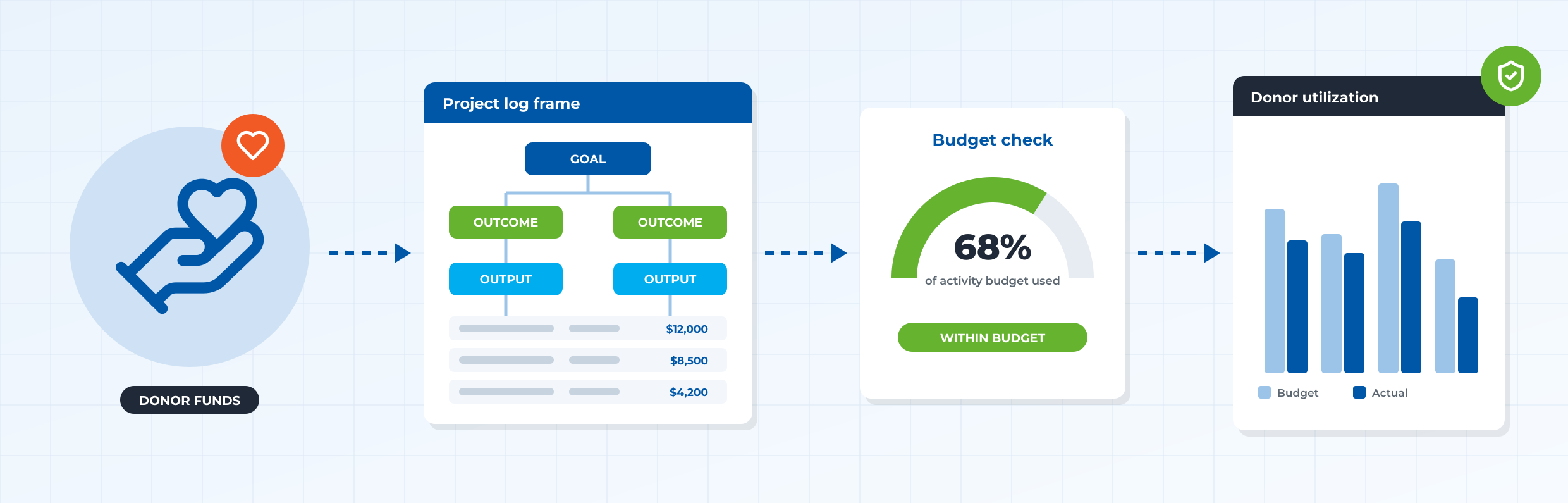
Most organizations still prove stewardship after the fact: transactions post to the general ledger, then get rebuilt into donor views in spreadsheets at month-end. The better approach is architectural. When nonprofit accounting software knows which donor-agreed activity every commitment belongs to, accountability stops being a reporting exercise and becomes a property of the system.
At Brightpoint Infotech, a Microsoft Solutions Partner, we’ve built that architecture into Microsoft Dynamics 365 Business Central for nonprofits and NGOs. This article sets out the four design principles behind it, and the questions every finance leader should ask of a nonprofit ERP.
The accountability gap: reports describe, architecture decides
Commercial ERP systems were designed around one question: what did each department spend against each account? Nonprofits answer to a different one: what did each donor’s money achieve against the activities it was given for? Their budgets come from the project tasks and activities in a donor proposal, often spanning one to several years, and one donor may fund several projects while one project has several donors.
That’s the core problem in NGO finance management. When the system can’t hold that structure, the finance team holds it instead, in spreadsheets, reconciliations and memory. Problems surface at reporting time, after the money is spent. The fix isn’t a better report. It’s a different design, built on four principles:
- The donor proposal is the budget. Activities, tasks not general ledger accounts, are the unit of control.
- Control sits at the point of commitment. Spending is checked against its funding activity before it posts, not after.
- Cash in staff hands is still donor money. Petty cash, Claims and travel advances run through request, approval and Advance settlement, so nothing stays unaccounted for.
- The donor report is a by-product. When every transaction carries its donor context, reporting becomes a query, not a project.
A reference architecture for nonprofit accounting software on Business Central
Architecture is where these principles become enforceable. In our design, every party that moves money (donors, staff and vendors) enters through standard Business Central processes, extended so purchases, advances and claims carry the project and activity that fund them, and donor income carries donor, area and theme dimensions. One control layer, the project log frame, sits at the center: spending is checked against it, and the donor reports read from it.
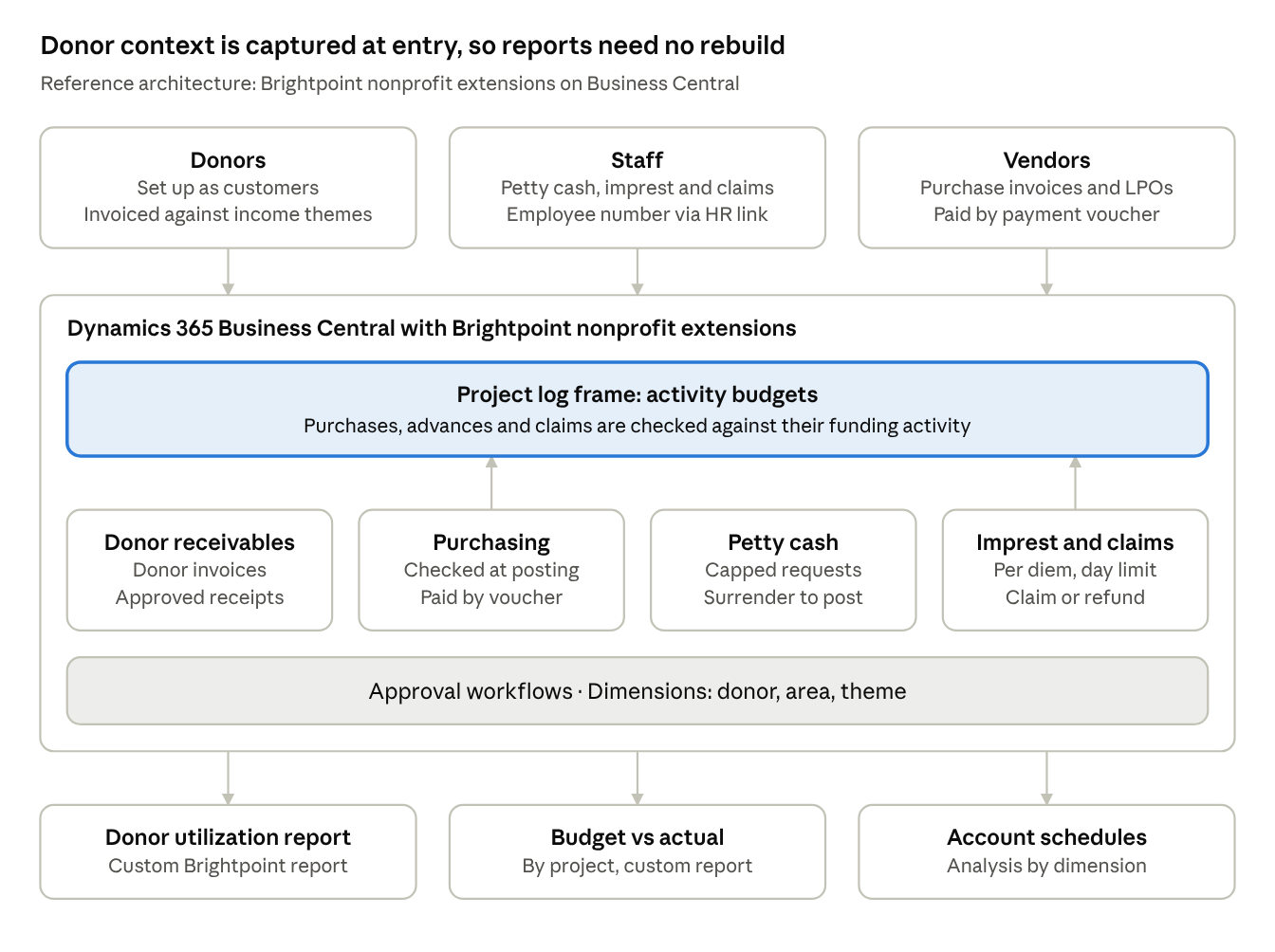
Donors and staff are both set up as customers, and staff records pick up employee numbers from the HR integration. So, the solution extends Business Central’s receivables, payables, cash management and approval workflows rather than replacing them. That’s a deliberate choice: finance teams keep a familiar ERP instead of learning a new one.
Principle 1: The donor proposal is the budget
Project budgeting for NGOs breaks down when the system’s budget and the donor’s budget are two different documents. Our approach removes the translation. Every project card links the funding donor and the project dimensions, so funds can be reported by project or by donor. Beneath it sits the log frame, the structure donors already use in proposals: goal, outcomes, outputs, indicators and activities.
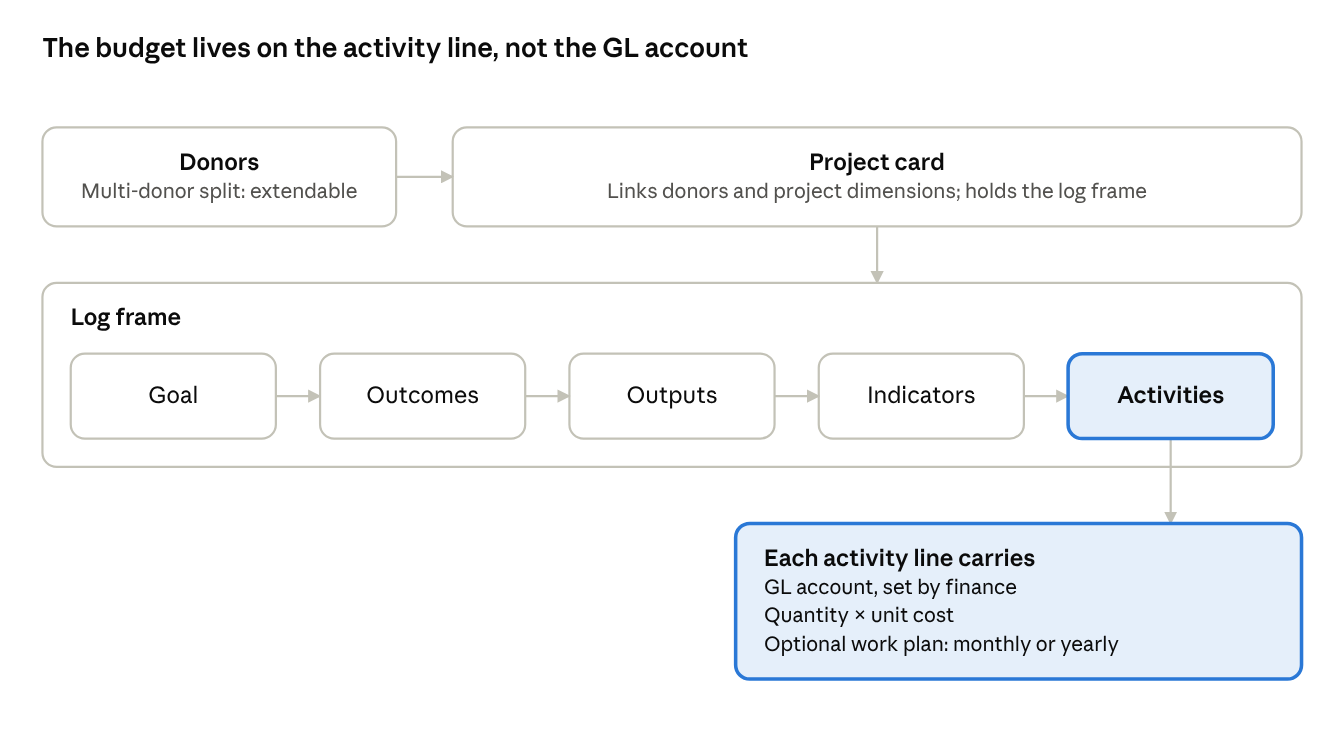
The money lives on the activity lines. Each activity line carries a general ledger account provided by finance, plus quantity and unit cost, and an optional work plan phases the budget by month or year. Where a project has several funders, the solution can be extended so the donor list holds each donor’s percentage share. Administrative costs stay on Business Central’s standard budget, linked through an “internal admin” project, so admin and program spend sit side by side.
Principle 2: Move the control point upstream
In many organizations, overspending is found in the budget vs actual report, after the money is committed. By then the donor conversation is about explanation, not prevention. Purpose-built nonprofit accounting software moves the check to the moment of spending.
In our design, every purchase invoice has to name the activity that funds it. The user selects the expense account, then the project and activity, and the activity list only shows lines budgeted for that account. Grant budget tracking stops being a monthly reconciliation and becomes a rule the system enforces.
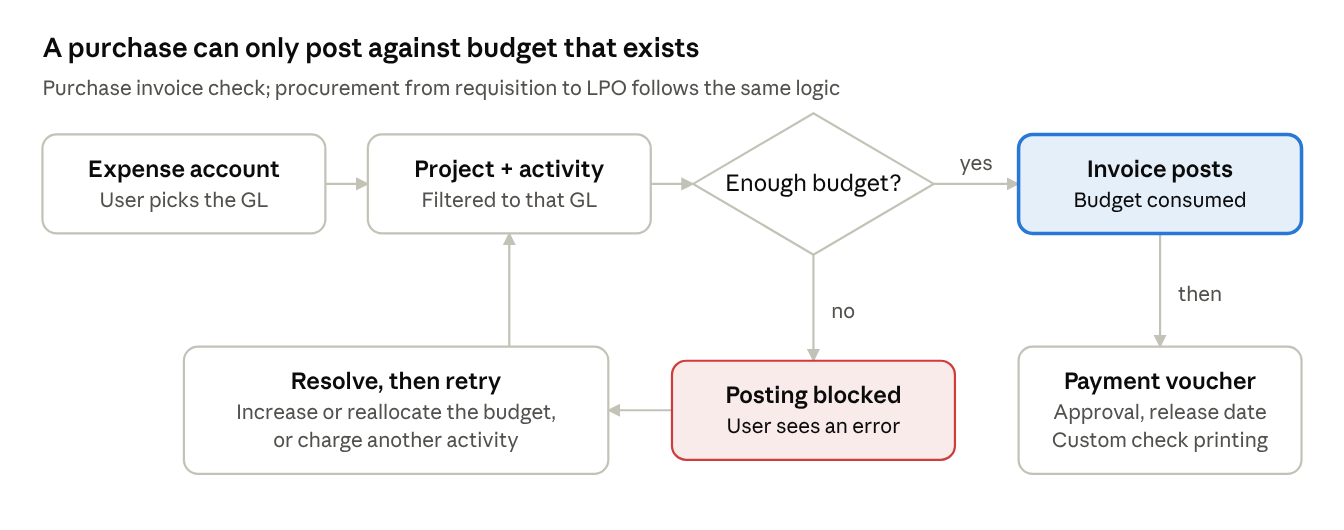
If the activity has enough budget, the invoice posts and consumes the project budget in the same step. If it doesn’t, posting is blocked until the budget is increased or reallocated, or the cost is charged to another activity. Procurement follows the same logic from requisition to local purchase order. Vendors are then paid through a payment voucher with approvals, a payment release date and check printing customized to the organization’s check sizes.
See budget control in action
Watch a purchase invoice get checked against a live project budget in Business Central.
Principle 3: Cash in staff hands is still donor money
Supplier invoices get scrutiny. Petty cash and travel advances often don’t, yet they’re donor funds too. A sound nonprofit ERP treats them as part of the same control system, with a complete request, approval, disbursement and surrender cycle.
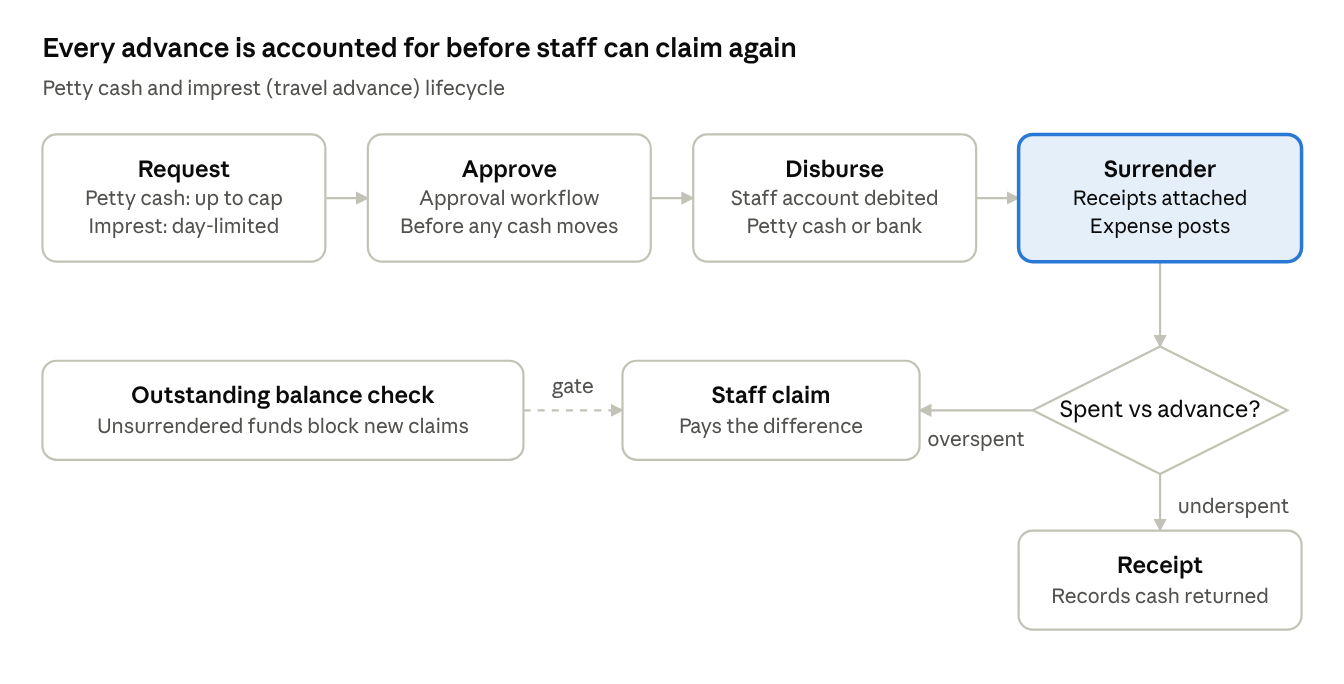
Petty cash requests are capped by a maximum set in cash management and paid from a bank flagged for petty cash. The surrender records actual spend with an attachment explaining the receipts, then posts the expense. Petty cash management software stops being a separate tool; it becomes part of the ERP.
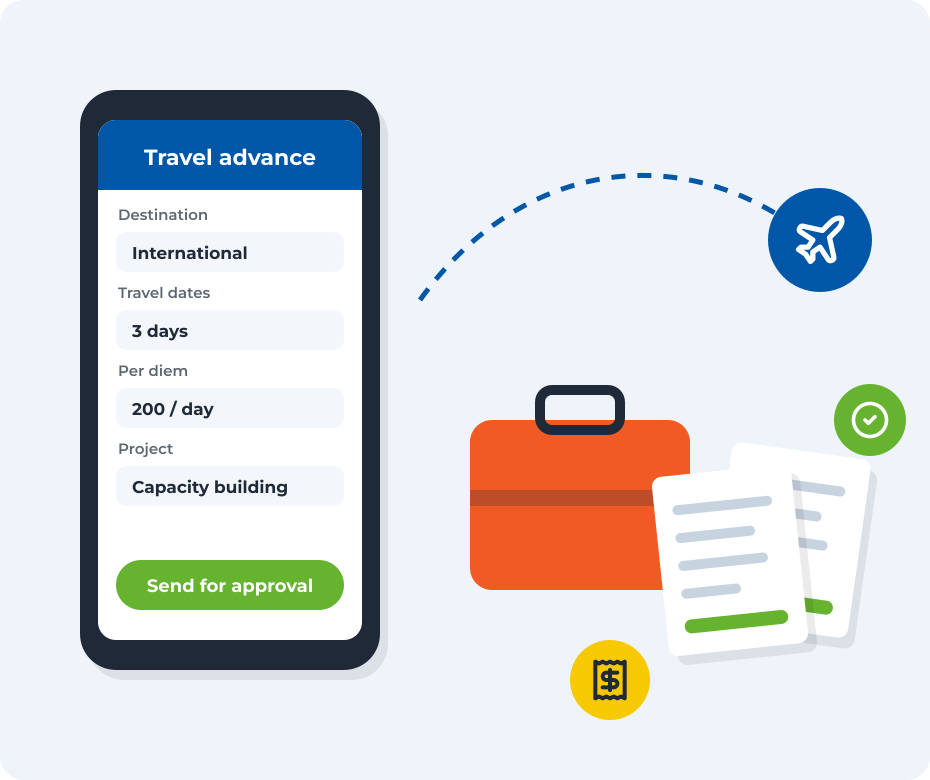
Travel advance and imprest management follows the same discipline. A request captures the destination (local or international), travel dates and per diem lines charged to project activities, and per diem can’t be claimed for more days than the trip. After the trip, the staff member surrenders the advance with receipts: overspending prompts a staff claim for the difference, underspending a receipt for the cash returned. Staff with unsurrendered funds can’t raise a new claim.
Principle 4: Let the donor report write itself
Donor management in Business Central starts with a simple modeling choice: donors are set up as customers, so the familiar receivables process applies. A sales invoice bills the donor against an income theme, such as health and nutrition or food security, and a custom fund form is shared with the donor. Funds are received through a custom receipt document that runs through an approval workflow and is applied to the donor’s open invoices, in full or in part.
Because one donor may fund several projects, income is analyzed by dimension (donor, area and theme) and through account schedules, rather than charged to a single project budget. The double entries themselves stay standard; what the design adds is the project, activity and dimension context around them:
| Transaction | Debit | Credit |
|---|---|---|
| Donor invoice | Donor | Income |
| Donor receipt | Bank | Donor |
| Purchase invoice (activity budget consumed) | Expense | Vendor |
| Payment voucher | Vendor | Bank |
| Petty cash disbursement | Staff | Petty cash bank |
| Petty cash surrender | Expense | Staff |
| Travel advance (imprest) | Staff | Bank |
| Imprest surrender | Expense | Staff |
With that trail in place, the reports donors ask for become queries rather than projects. Our customizations include a donor utilization report and a project budget vs actual report for donors, both built by Brightpoint rather than standard Business Central reports, and designed for the moment every funder asks for proof.
Beyond NGOs: same architecture, different dimension
The pattern isn’t unique to grant-funded work. Advances, surrenders and claims suit any organization that gives staff travel money. For organizations that budget by department or branch rather than by project, we’ve built a department-based budget that records a commitment before an advance is approved, and it’s already being applied for a microfinance organization. The control point stays the same; only the budget dimension changes.
The economics: Dynamics 365 Business Central nonprofit pricing
Microsoft says eligible nonprofits can get Dynamics 365 Business Central from US$32 per user per month, 60% off commercial pricing. Eligibility is confirmed through Microsoft’s nonprofit program, and Brightpoint can help you scope the right setup.
Five questions to ask of any nonprofit accounting software
- Can every expense be traced to the donor-agreed activity that funds it?
- Does the system stop spending when an activity’s budget runs out, or only report it later?
- Must petty cash and travel advances be surrendered before staff can claim more?
- Can you produce a donor utilization report without rebuilding it in spreadsheets?
- Do approvals separate the person raising a payment from the person releasing it?
If any answer is “no”, the gap isn’t in your reports. It’s in your architecture.
Donors fund outcomes, not spreadsheets. The organizations that keep their trust will be the ones whose systems can prove stewardship the moment money moves, not weeks later. That’s the standard we build to at Brightpoint Infotech.
Frequently asked questions
Is Business Central good accounting software for nonprofits?
Yes, when it’s configured for nonprofit budgeting. Brightpoint’s customizations add log-frame project budgets, donor billing and receipts, budget checks on purchases, petty cash, travel advances and donor reports to Microsoft Dynamics 365 Business Central.
How does nonprofit accounting software track donor funds?
Donors are set up as customers and billed against income themes. Spending is charged to the project activity a donor funded, so budget vs actual and donor utilization reports show exactly how funds were used.
Can Business Central stop spending beyond a grant budget?
Yes. In Brightpoint’s solution, a purchase invoice must name the project activity that funds it. If that activity has no budget left, the user gets an error and can’t post until the budget is increased, reallocated or charged elsewhere.
How are petty cash and travel advances managed?
Both follow a request, approval, disbursement and surrender cycle. Petty cash requests are capped by a set maximum. Travel advances are limited to the trip’s days, and staff with unsurrendered funds can’t raise new claims.
Can one project be funded by several donors?
Yes. The solution can be extended so a project’s donor list holds several donors, each with a percentage share of the funding.
Is there nonprofit pricing for Dynamics 365 Business Central?
Microsoft says eligible nonprofits get Business Central from US$32 per user per month, 60% off commercial pricing. Eligibility is confirmed through Microsoft’s nonprofit program.
Do these features only work for NGOs?
No. Travel advances, surrenders and claims suit any organization that advances money to staff, and a department-based budget option supports organizations that don’t budget by project.
Ready for nonprofit accounting software your donors can trust?
Brightpoint Infotech helps NGOs and nonprofit organizations run log-frame budgets, donor funds and staff advances in Microsoft Dynamics 365 Business Central. Book a nonprofit demo or email info@brightpointinfotech.com.
Book a nonprofit demo


