Smarter Cash Flow Forecasting with Microsoft Dynamics 365 Business Central
Introduction
Cash flow is one of the most critical indicators of business health, yet it’s also one of the most difficult to manage effectively. Many organizations still rely on static reports, spreadsheets, or delayed financial data to understand their liquidity position. By the time issues become visible, the opportunity to act has often passed.
This is where modern ERP solutions like Microsoft Dynamics 365 Business Central are transforming how finance teams operate. With built-in cash flow forecasting capabilities, businesses can move beyond reactive cash monitoring and toward proactive financial planning.
Instead of asking, “What happened to our cash?”, finance leaders can confidently answer, “What will happen to our cash and what should we do about it?”
Why this matters
- Turns day-to-day finance and operational activity into a forward-looking liquidity view.
- Helps teams identify expected surplus and shortfall periods earlier.
Supports better timing decisions for collections, spend, purchasing, and vendor commitments
What Business Central brings together
- Receivables and payables
- Sales orders and purchase orders
- Liquid funds and forecast entries
- Manual revenues and expenses
Optional Azure AI–based predictive support
At a glance
Cash flow forecasting in Business Central gives finance leaders a practical short-term forecast of expected inflows and outflows. Instead of relying only on static balances, the feature combines accounting data, operational commitments, and planning inputs to create a more actionable cash view.
Business outcomes you can expect· Provides earlier visibility into upcoming cash pressure and potential shortfalls. · Helps finance and operations work from a shared forward-looking cash view. · Supports a structured approach for combining accounting signals, open commitments, and planned cash events. |
What is included in the forecast
Business Central can build the forecast from multiple source types so the result is more than a simple aging report or bank balance snapshot.
|
Area |
What Business Central can include |
Why it matters to finance |
|
Receivables |
Open customer ledger entries and expected collections |
Improves visibility into incoming cash and overdue exposure |
|
Payables |
Vendor obligations and expected payment dates |
Helps plan payment timing and avoid short-term pressure |
|
Sales & purchase orders |
Open operational commitments not yet posted |
Brings pipeline and procurement impact into the forecast sooner |
|
Liquid funds |
Bank and cash balances |
Anchors the forecast to currently available cash |
|
Manual revenues / expenses |
Planned one-off items and internal estimates |
Lets finance add known events that are not yet in transactions |
|
Budgets / planning sources |
Budget-driven or planning-related inputs where configured |
Supports a more complete working forecast |

Screenshot: source selection
Suggest Worksheet Lines page with selectable source types.
What this screen helps communicate
- Finance can control which source types are included in the worksheet generation process.
- The forecast can blend actual accounting signals with operational and manual planning inputs.
This setup supports a more transparent explanation of how the forecast was built.
How the forecasting workflow works
|
1 |
Set up the forecast |
|
2 |
Select source types |
|
3 |
Suggest worksheet lines |
|
4 |
Recalculate and analyze |
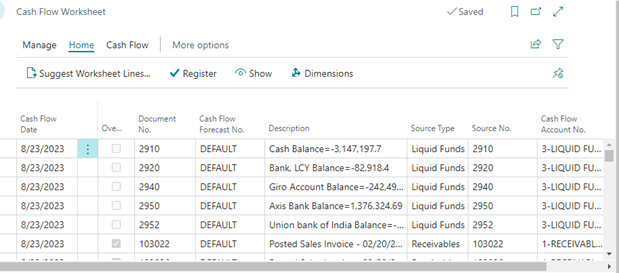
Screenshot: worksheet review
Real screen example: Cash Flow Worksheet showing forecast lines from multiple source types.
Why the worksheet matters
- It provides a review layer before forecast entries are registered.
- Finance teams can inspect dates, descriptions, source type, and amounts in one place.
- The worksheet helps explain where projected movements are coming from before discussing the final chart with management.
Cash Flow Forecast Statistics page in Business Central.
What decision-makers can see
- Contribution by source category such as receivables, payables, orders, and liquid funds
- A compact summary of forecast composition for management reviews
A clearer narrative around liquidity trend, exposure, and timing
What business leaders can quickly understand
- The forecast chart highlights the overall cash trend and surfaces possible shortfall periods earlier.
- The worksheet provides drillback visibility into the forecast lines and their source types.
- The statistics view summarizes forecast composition for management reviews and planning discussions.
Business value summary
- Faster visibility into future cash timing.
- Better alignment between finance data and operational commitments.
More confidence in internal planning discussions and leadership reporting.
Implementation considerations
Key setup and governance considerations
-
Forecast quality improves when due dates, posting discipline, and order data are maintained consistently.
-
Teams should decide which source types belong in the formal forecast and which are used only for scenario planning.
-
Manual revenues and expenses are useful for one-time events, but they work best with clear ownership and review discipline.
-
Predictive support can be enabled where the organization wants a more comprehensive forecasting approach.
Why organizations choose this capability
|
Value highlights · Business Central supports more than posted transactions alone; it can also incorporate open orders, liquid funds, and manual planning items. · It helps finance teams move from reactive cash monitoring to proactive cash planning. · Because the process includes reviewable worksheet lines and visible source types, the forecast is easier to understand, explain, and trust. |
Where this resonates most
Typical use cases
- Working-capital visibility for growing finance teams
- Weekly or monthly liquidity reviews
Management discussions around payment timing and procurement commitments
Common stakeholder audiences
- CFO and controller
- Finance manager and treasury lead
Business unit leaders who influence large cash events
Final Thoughts
Cash flow forecasting is no longer a “nice-to-have”—it’s a critical capability for modern businesses. In an environment where timing is everything, having a clear, forward-looking view of liquidity can make the difference between growth and constraint.
With Microsoft Dynamics 365 Business Central, organizations gain more than just a forecasting tool. They gain a comprehensive, transparent, and actionable view of their cash position.
And with the support of an experienced partner like Brightpoint Infotech, they can turn that visibility into real business value.
The result? Better decisions, stronger financial control, and greater confidence in the future.
Explore Brightpoint Infotech Solutions
Explore Our Recent Blogs & Resources
Whether you are a start-up, an SMB, or an enterprise, the Brightpoint Infotech blog is the best place to get inspired and learn more about Microsoft Business Applications.